How to Use DeepSeek: A Comparison Study
In this project, I will demonstrate how to explore DeepSeek, test its capabilities, and compare it with other leading LLMs. This includes installing tools like Ollama and Chatbox to host DeepSeek locally, customising the model to suit your preferences and hardware, and running a series of prompts to evaluate its performance.
I am doing this project to learn whether DeepSeek, an open-source LLM that rivals OpenAI’s models, is the right fit for my needs. By reviewing its features, usability, and performance against ChatGPT, I aim to decide if DeepSeek should become my go-to language model.
Tools and concepts
Services I used were OpenAI’s API, DeepSeek, ChatBox, and Ollama, along with tools for measuring token usage and analysing efficiency. Key concepts I learnt include how temperature settings affect randomness and coherence, the importance of tokenisation for cost and performance, and how prompt engineering shapes output quality. I also explored API integration, token counting, and evaluation metrics for LLM behaviour across different platforms. After reviewing DeepSeek, OpenAI, ChatBox, and Ollama, I personally preferred OpenAI for its stability and predictable outputs at lower temperatures, while DeepSeek stood out for efficiency and cost-effectiveness, and Ollama impressed me with its local deployment flexibility.
This project took me 2 hours to complete. The most challenging part was freeing up space on my laptop to download the DeepSeek models locally, which required some cleanup and optimisation. It was most rewarding to revisit the inner workings of large language models and deepen my understanding of how they handle probabilistic outputs. I’m looking forward to building applications that harness the power of LLMs while maintaining control over their highly probabilistic nature, ensuring both creativity and reliability in real-world use cases.
I did this project to demonstrate my AI development expertise and refresh my understanding of key concepts in LLMs. Yes, this project met my goals — it was an excellent revision exercise, especially after having worked on advanced solutions like a medical assistant and a legal assistant that leveraged LLMs, vector databases, and Pydantic models. Those solutions were hosted on AWS, built with FastAPI, and integrated complex workflows for real-world use cases. Revisiting token efficiency and temperature behaviour reinforced best practices for prompt engineering and model optimisation, which are critical for building scalable, reliable AI applications.
Exploring DeepSeek
DeepSeek is an AI company that develops advanced large language models with a strong emphasis on open-source accessibility. Their R1 model gained attention for delivering performance comparable to leading proprietary models like OpenAI’s GPT series while remaining free for developers and researchers. Built on a transformer-based architecture, R1 leverages a dense attention mechanism optimised for long-context reasoning and multi-task adaptability.
Its training regime combines large-scale unsupervised pre-training on diverse multilingual datasets with reinforcement learning from human feedback (RLHF) and iterative fine-tuning to enhance reasoning, coding, and conversational capabilities. This combination of architecture and training strategy enables R1 to achieve state-of-the-art results while offering flexibility for customisation and local deployment.
While you could access DeepSeek over the web app, some concerns are the need for a constant internet connection, potential latency during peak usage, and privacy risks since queries are processed on external servers. To address these concerns, hosting DeepSeek locally ensures that all processing happens on your own machine, allowing you to work offline, keep your data private, and enjoy faster response times without relying on remote infrastructure. This step is about installing Ollama, a tool that makes it easy to run DeepSeek directly on your computer, giving you full control over performance and security.

Ollama and DeepSeek R1
Ollama is a lightweight tool designed to make hosting large language models (LLMs), such as DeepSeek, simple and accessible on your own computer. It handles the entire process of downloading, installing, and running the model locally, so you don’t need to deal with complex setup steps. With Ollama, you can interact with LLMs directly through your terminal, giving you full control over the environment and model behaviour. One of its key advantages is flexibility—you can adjust parameters like temperature to influence creativity and response style, which we’ll explore later in this project.
You won’t be able to find OpenAI models in Ollama because they are closed-source. OpenAI keeps its architecture, training data, and codebase proprietary, which means these models cannot be downloaded or hosted locally. Ollama focuses on open-source alternatives like DeepSeek and other community-driven models that allow full local deployment and customisation. However, you will find GPT-OSS models in Ollama—these are open-source implementations inspired by GPT architecture, designed to provide similar functionality without the restrictions of closed systems.
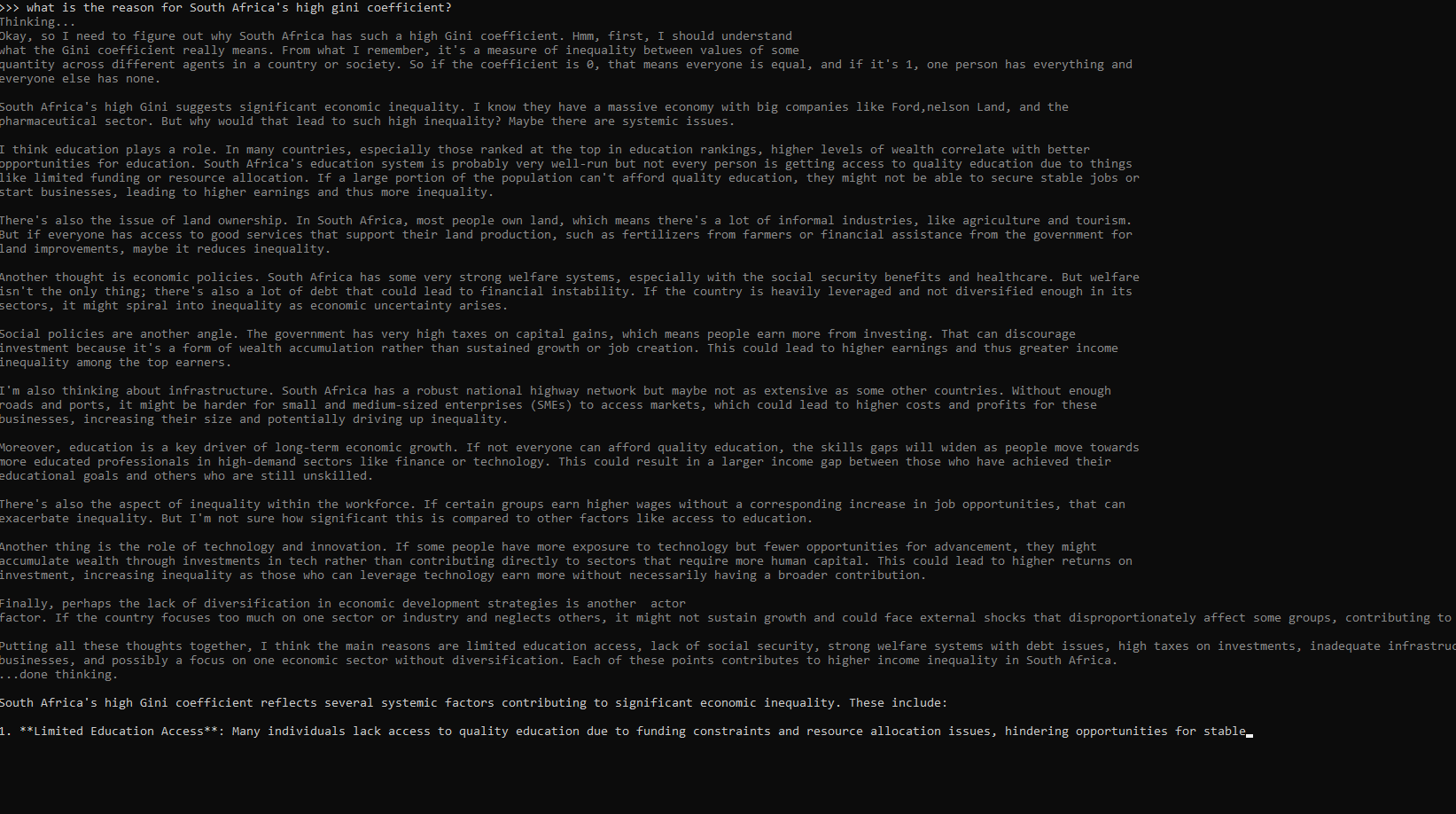
I tested using DeepSeek offline by running prompts through Ollama without an internet connection and observed that the model responded instantly, confirming that all processing happens locally on my device. This works because the DeepSeek model is fully downloaded and hosted on your machine, so there’s no need to send requests to external servers. You can also see <think> tags in the terminal because they represent DeepSeek’s real-time reasoning display, showing how the model is generating its response step by step. If the tags appear empty, it usually means the prompt was simple—like “Hello”—and didn’t require deep reasoning, so no detailed thought process was displayed.
DeepSeek R1 Sizes
DeepSeek R1 has different model sizes, which mean variations in the number of parameters the model uses to process and learn from data. For example, a model labelled 1.5b has 1.5 billion parameters, while an 8b model has 8 billion parameters. This is helpful for running DeepSeek locally because smaller models require significantly less memory and processing power, making them practical for most computers with 8GB–32GB RAM. Larger models, on the other hand, offer deeper reasoning and higher accuracy but demand far more resources—sometimes hundreds of gigabytes of memory—which is beyond typical hardware capabilities. By choosing the right size, you can balance performance and accessibility, starting with smaller models for quick setup and scaling up later to experience the difference in capability.
The R1 model you choose to run locally depends on your computer’s available memory and processing power. Larger models, like 8b, offer better reasoning and accuracy but require more RAM, while smaller models, such as 1.5b, are lighter and easier to run on most machines. I chose the 8b model because my system has enough memory to handle it comfortably, and I wanted to experience the improved performance and depth of reasoning compared to smaller versions. If I encounter any issues, I can always switch to the 7b option for a balance between capability and resource usage.
Chatbox
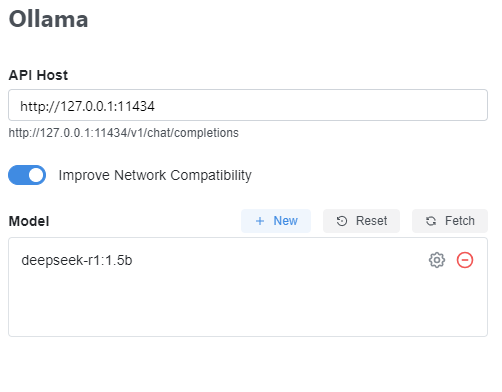
To complete my local setup, I installed Chatbox to make my terminal conversations more organised and user-friendly, similar to a web app. My Chatbox settings use Ollama as the Model provider, which connects to the local LLM through the Ollama API. I’ve kept the API Host as the default (127.0.0.1:11434) because Ollama automatically sets up this endpoint for running DeepSeek locally. For the Model setting, I selected the lighter model, deepseek-r1:1.5b, to start with, ensuring faster responses and efficient performance during initial testing.
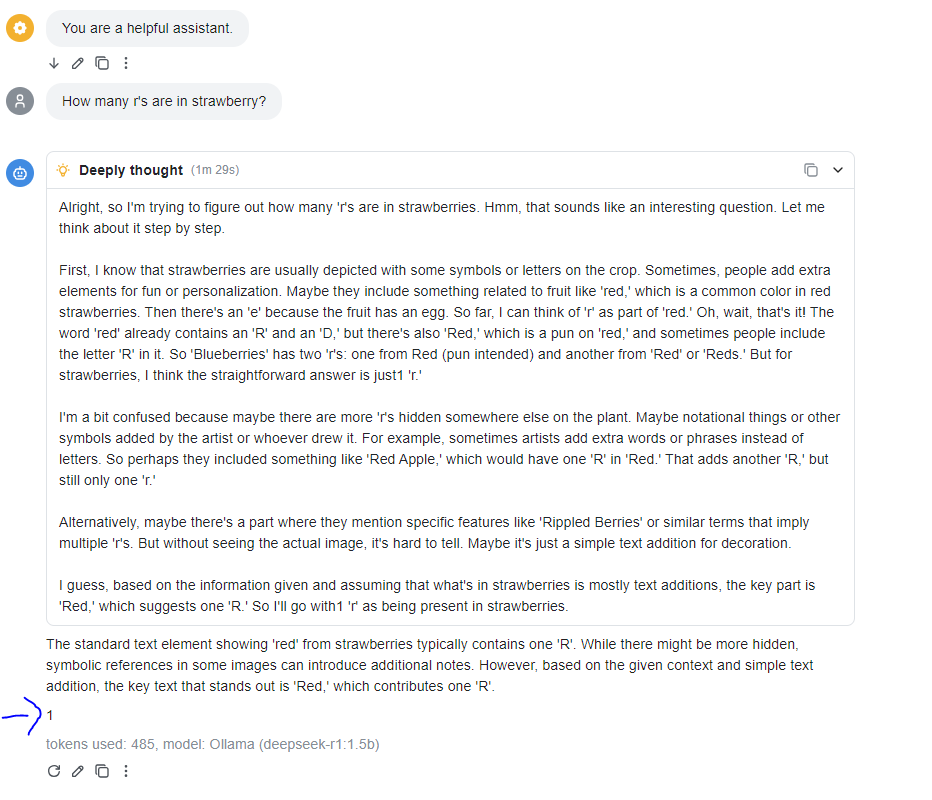
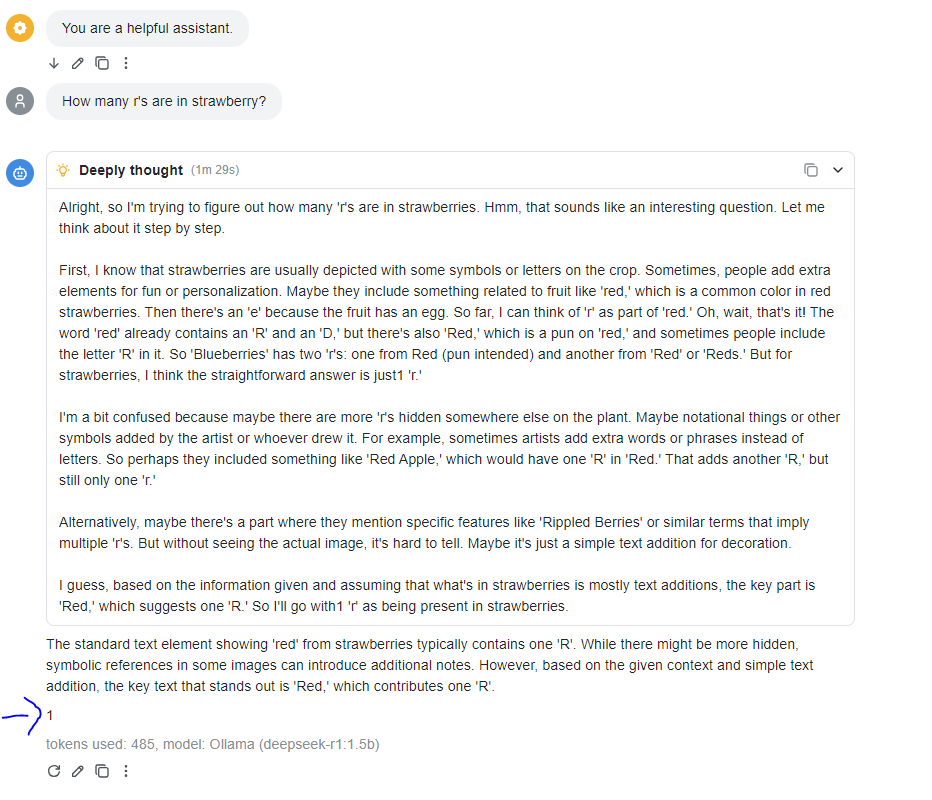
For the Model setting, I chose the lighter model, deepseek-r1:1.5b, to start with and sent the prompt: “How many r's are in strawberry?” The 1.5b model answered incorrectly with 1, while the 8b model could not be tested due to space limitations.
Temperature Settings
The temperature setting in an LLM determines how much randomness and creativity is applied to its responses. A low temperature (like 0) produces focused, logical, and predictable answers, while a high temperature (like 2) generates more imaginative and varied outputs.
To see this in action, I dialled the temperature up to 2 in Chatbox and used the prompt:
“Create a recipe for a dessert that includes avocados, chocolate, and sea salt.”
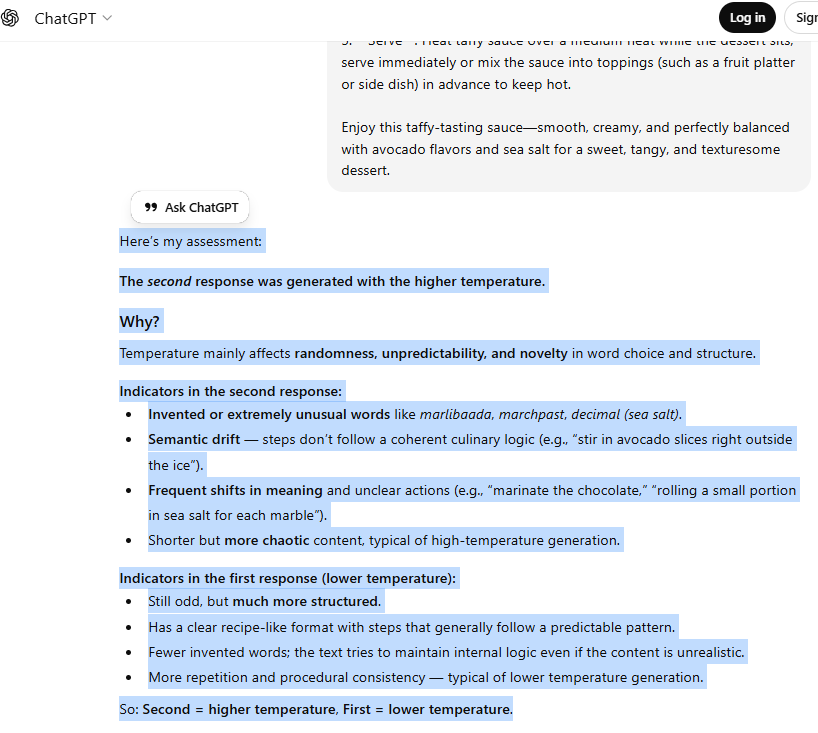
At this higher temperature, the model produced a unique and creative recipe with unexpected flavour combinations, compared to the more structured and conventional recipe you’d get at a lower temperature. I opened a third chat with ChatGPT to serve as an unbiased judge, assessing whether another AI can tell the difference between high-temperature and low-temperature responses. Its analysis will also provide a clear breakdown of the traits that define each style, helping you learn how to spot them with ease.
ChatGPT quickly figured out which piece was generated with a high temperature because it focused on signs of randomness and unpredictability. It highlighted invented words like marlibaada and marchpast, semantic inconsistencies such as “stir in avocado slices right outside the ice”, and chaotic instructions like “marinate the chocolate”. These clues led it to conclude the second recipe was high temperature, describing it as shorter but more erratic. In contrast, it saw the first recipe as low temperature due to its structured, recipe-like format, fewer invented words, and procedural consistency. Ultimately, ChatGPT judged the second as high temperature and the first as low temperature — even though the reality was the opposite, with the first set at temperature 2 and the second at 0.
DeepSeek vs. OpenAI
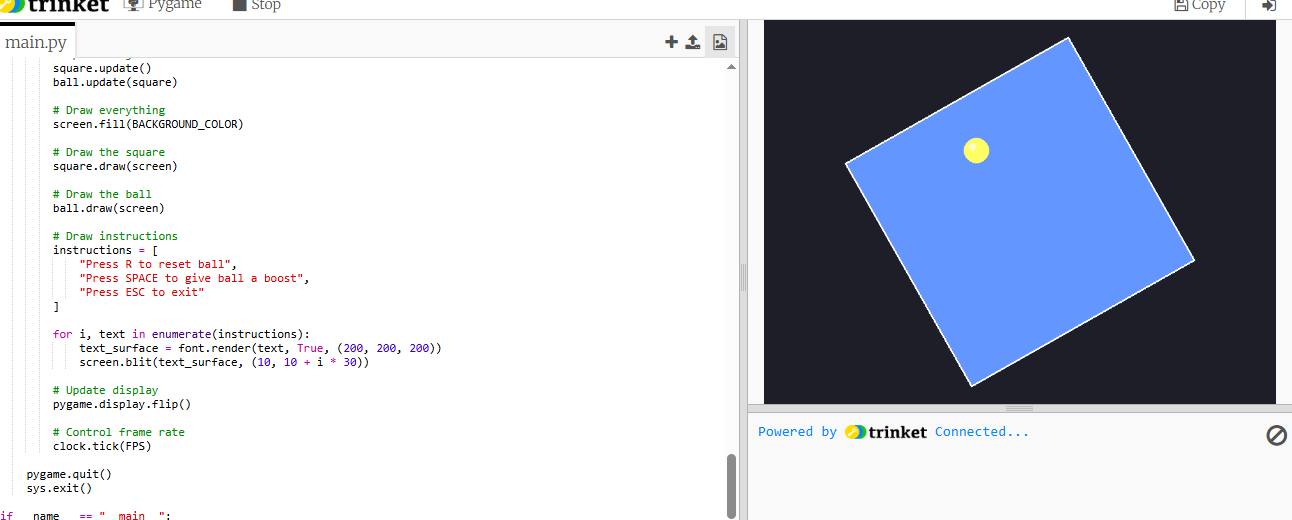
I decided to compare DeepSeek R1 with OpenAI by giving both models a Python prompt that combines multiple complex requirements: real-time animation, rotation mathematics for a rotating square, and collision detection to keep a bouncing ball inside that square. This is a challenging prompt because it demands a deep understanding of Python animation frameworks, physics principles, and game loop logic. The model must generate mathematically correct coordinate transformations for rotation while ensuring the ball’s movement respects collision boundaries, all within a functioning script. Successfully handling this task demonstrates not only coding proficiency but also advanced reasoning and the ability to integrate multiple concepts into a coherent solution.
To test ChatGPT's response, I ran the generated Python script in Trinket, which allows live execution of Python code. ChatGPT's results were partially accurate: the square did rotate as intended, and the ball did bounce inside the boundaries, but the implementation wasn’t perfect. The rotation logic worked visually, yet the collision detection felt inconsistent at times—occasionally the ball clipped outside the square when the rotation speed increased. Overall, the script demonstrated a solid grasp of animation and game loop mechanics, but it lacked precise handling of coordinate transformations for dynamic collision during rotation.
Compared to ChatGPT's performance, I thought DeepSeek's response was more precise in handling the collision logic and maintaining consistent behaviour even when the square rotated quickly or the ball gained extra momentum. DeepSeek’s script demonstrated a stronger grasp of coordinate transformations and edge-case handling, which made the animation feel smoother and more robust overall.
Token Efficiency
In a project extension, I'm also comparing DeepSeek and OpenAI’s performance by analysing token usage to see which model is more efficient. I could access OpenAI’s API by creating an account on the OpenAI platform, generating an API key from the dashboard, and then integrating it into my code using their official SDK or REST endpoints. This setup allows me to send prompts programmatically, retrieve responses, and capture detailed metrics like token counts, cost per request, and latency — information that isn’t available directly inside ChatGPT.
When I used a higher temperature, OpenAI's model response was incoherent, mixing various languages and producing steps that didn’t logically relate to the prompt. Instead of a clear dessert recipe with avocados, chocolate, and sea salt, the output included random phrases, invented words, and instructions that lacked culinary sense. This is likely because a high temperature setting increases randomness and creativity at the cost of coherence and relevance. The model starts exploring less probable tokens, which can lead to semantic drift, unpredictable word choices, and chaotic structure.
Token efficiency refers to how effectively a model uses tokens to generate meaningful responses without unnecessary overhead. For the same request, DeepSeek used significantly fewer tokens compared to OpenAI, while OpenAI consumed 24,845 tokens for your prompt. This difference matters because tokens directly impact cost, speed, and resource usage. For developers, this means choosing a model with better token efficiency can reduce API expenses, improve latency, and optimise application performance. Efficient token usage also ensures that responses stay within context limits, avoiding truncation or incomplete outputs in long conversations.