Encrypt Data with AWS KMS
Data security is key to developing secure applications - including those in the cloud and breaches can be the end of a company. So how do we protect unauthorised data access, while ensuring access to the right people?
Encryption is the process of transforming data to a secure format where only authorized entities have the ability to transform the data into usable format. In this project, I will use AWS KMS (Key Management Service) to encrypt a database and show how we can provide secure access to the data in the database.
Encryption and KMS
Encryption is a process that uses algorithms to convert data into a secure format called ciphertext. Only authorised users can decrypt and restore the data to its original, readable state. Otherwise, it looks like a scrambled piece of text like bihtueg34509ua. Encryption is used to secure user data, transactions, files and more, even the internet with https uses a encryption to protect the data you send across the network.
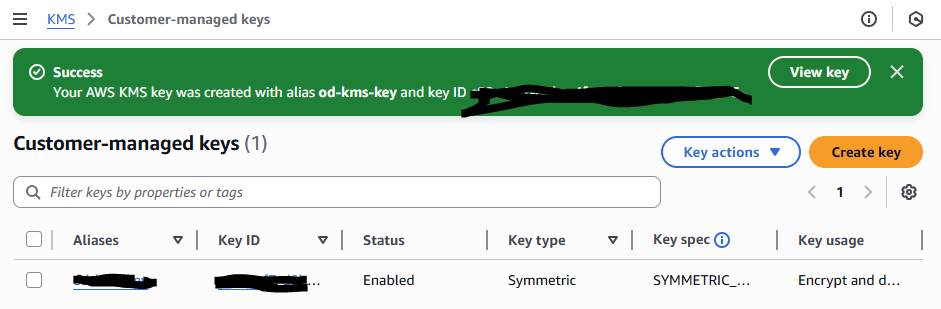
Encryption keys are used to tell the encryption algorithm exactly how to transform plain text(data) into the jumbled up format called cipher text. AWS Key Management Service (KMS) is a secure vault for your encryption keys. You use KMS to create, manage, and use encryption keys that protect the data in your AWS resources.
Key management systems are important because it can manage all your encryption keys, like what it encrypts or who has access, in one place. Your keys are safe in a KMS, so you wouldn't have to worry about losing them or someone stealing them. You can also use a KMS to create new keys needed for encryption or decryption.
Encryption keys are broadly categorized as symmetric or asymmetric. Symmetric encryption use a single encryption key to both lock (encrypt) and unlock (decrypt) your data while asymmetric encryption works with a pair of keys: a public key to encrypt and a private key to decrypt.
A symmetric key is set up for this project because they are generally faster and more efficient for encrypting large amounts of data, and this project will make use of a DynamoDB table. Asymmetric keys are often used when you need to securely share data between multiple parties, like sending information over the internet.
Encrypting Data
The encryption key will safeguard data in DynamoDB, which is a AWS database service. DynamoDB is a fast and flexible option to store data and is typically a great choice for applications that need quick access to large volumes of data. The different encryption options in DynamoDB include AWS owned key , AWS managed key, and customer managed key. Their differences are based on where the key is store, managed, and owned. For this project, the we used the customer managed key that we created in KMS - this key is stored in my account and managed by me

Data Visibility
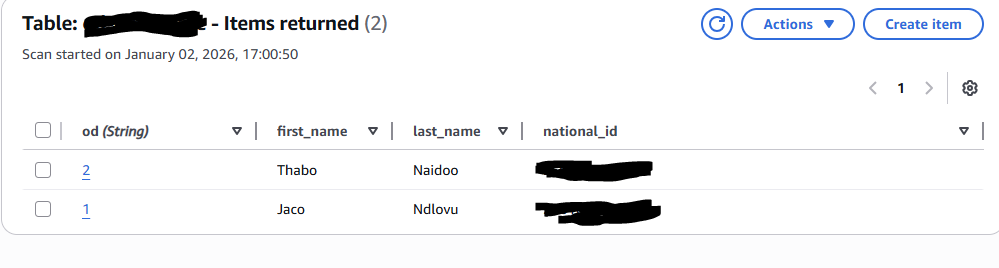
Rather than controlling who has access to the key, KMS manages user permissions by managing who has access to specific actions of the key such as decrypt and encrypt. This is different from other types of keys like EC2 instant access keys, which can be used as long as you have access to them. Despite encrypting the DynamoDB table, we can still see the table's items because I am an authorized user. DynamoDB uses transparent data encryption, which means that the encrypted data is automatically decrypted when accessed by an authorized user - enabling them to use the data instantly.
Denying Access
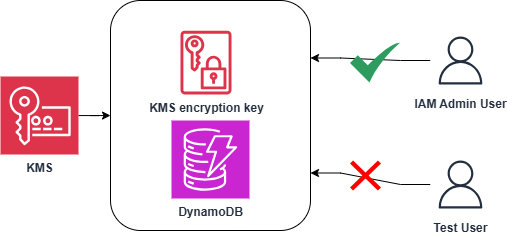
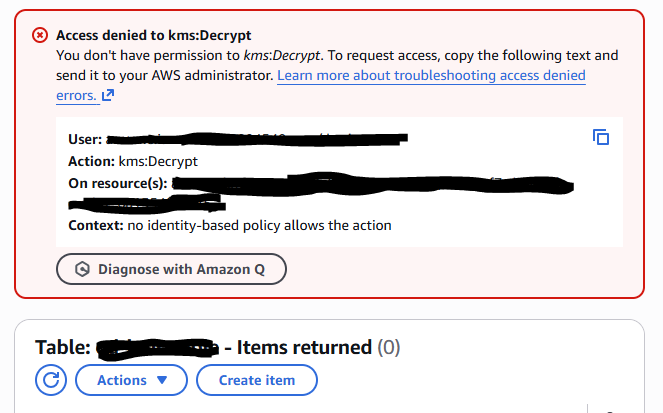
I configured a new IAM user to have full access to DynamoDB. The permission policies I granted this user are AmazonDynamoDBFullAccess but not access to the AWS KMS key created earlier.
After accessing the DynamoDB table as the test user, I encountered access denied to kms:Decrypt error because I did not have permission to that action. This confirmed that the user does not have access to the key used to the encrypt and decrypt the data even though they could access DynamoDB.
Granting Access
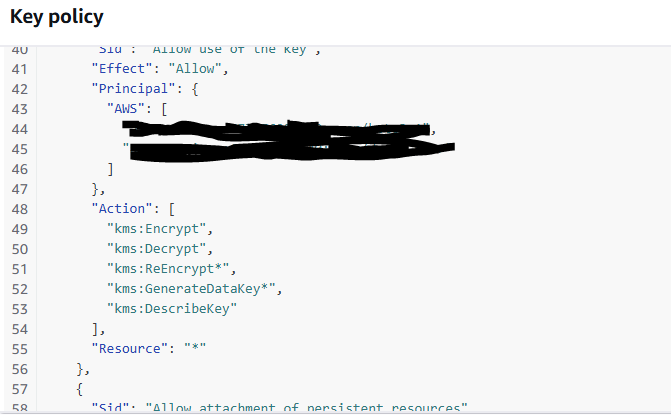
To let the test user use the encryption key, head to KMS console, select the key created, and add the test user to list of key users. The key's policy was updated to include the ARN for this user as a principal.
Using the test user, I retried to access the items in the DynamoDB table and no permission error occurred and the items were decrypted which confirmed that the test user was successfully given added to the KMS key policy.
Encryption secures data instead of only controlling access to the data. I could combine encryption with security groups/NACLs to add layers of security where only users with access permissions and decryption keys can view the data - actually, this is recommended, unless constrained by cost but be wary of taking the cheap route for security.